Level 1476 · Completion reviewed
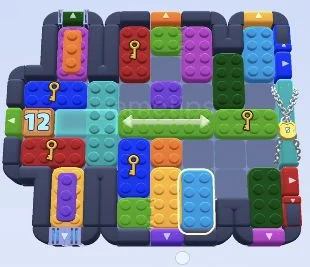
Color Block Jam Level 1476Five keys and the horizontal green bar
The long green bar can slide only sideways, so use it as a movable divider rather than trying to turn it. Work the key pieces through the centre while the left gate counts down from 12. Start at the successful replay, not the failed opening attempt.
BEFORE YOU START
Does this match your board?
- Long light-green bar with left/right arrows across the middle.
- Left green gate marked 12; chained cyan gate on the right marked 5.
- Blue, red and green key pieces; two narrow pieces with coloured outer layers.
Different board? Use the screenshots, not just the level number. Stop if the shapes or gates do not match.
Successful replay starts around 2:04 ↗FOLLOW THE ORDER
Your route, one checkpoint at a time
0 / 6 Checkpoints completed
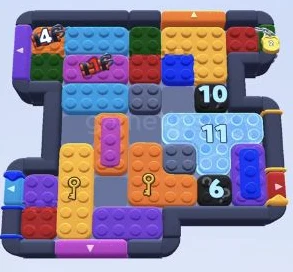
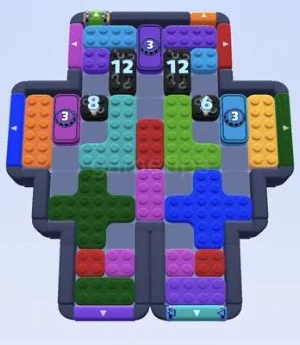
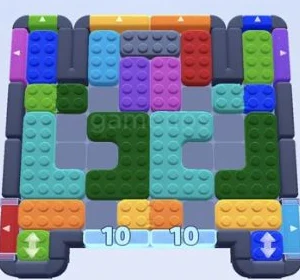
Each image shows the target for that section. Open the video at the beginning of the section for the individual drags, then compare your position with the image.
- 01
Park the green bar on the right
Slide the long arrow bar to the right so the centre column can take the vertical blue key piece. Move that blue piece upward into the gap beside the top red key block. The left gate reads 11 and the right lock reads 3 at this checkpoint.
Watch this section · 2:04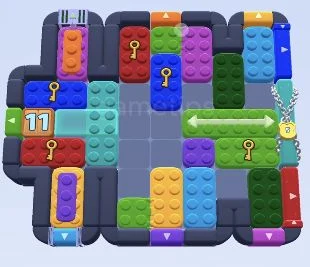
Checkpoint · 2:15Game Tips - 02
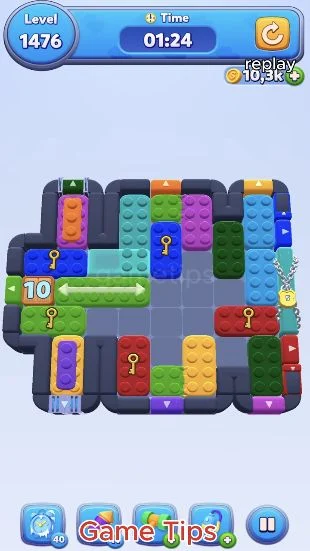
Move the key pieces through the centre
The blue vertical key block is high in the middle, and the red key pieces use the lower part of that column. The green bar has returned toward the left. Match the gate at 10 and the lock at 3 before continuing the key cycle.
Watch this section · 2:15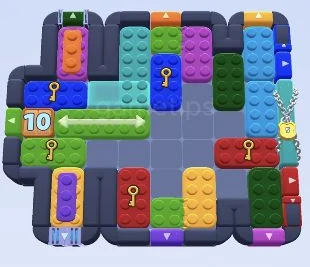
Checkpoint · 2:34Game Tips - 03
Keep the lower-left working lane open
Use the empty lower-left row to place the horizontal blue key piece beside the vertical blue key piece. The green key bar stays to their left, while the long arrow bar stays right. The left counter is now 8; preserve this working row while routing the keys.
Watch this section · 2:34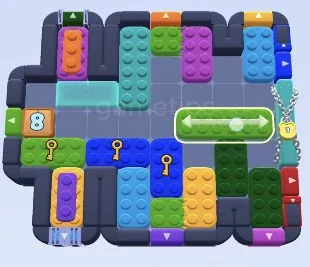
Checkpoint · 2:53Game Tips - 04
Prepare the last green key
The left counter reads 5 and the right lock reads 1. The green key bar can now use the open middle above the long arrow bar. Keep that path available, and use the lower pockets to hold the layered pieces without blocking the remaining key.
Watch this section · 2:53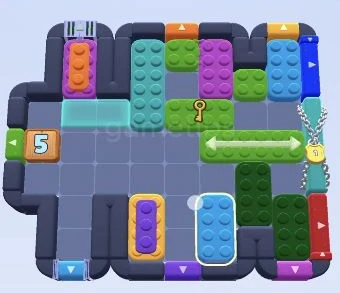
Checkpoint · 3:12Game Tips - 05
Set up the sideways escape
The left gate is down to 1, and the long arrow bar is aligned with it on the left. The top-right piece has revealed a purple layer. Complete the next clear, then send the long green bar through the left opening; do not try to lower it to a bottom gate.
Watch this section · 3:12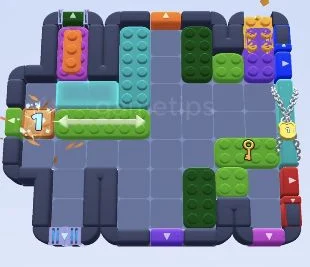
Checkpoint · 3:32Game Tips - 06
Use the empty board for the last pieces
Only small green and cyan pieces remain. The horizontal cyan piece is staged along the bottom, and a small cyan square is on the left. Follow the last exits in the replay; the completion screen appears near 3:57 with 15 seconds remaining.
Watch this section · 3:32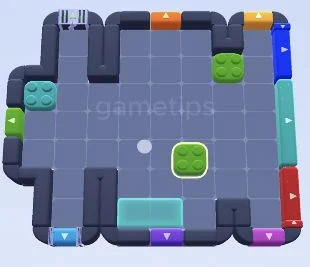
Checkpoint · 3:52Game Tips
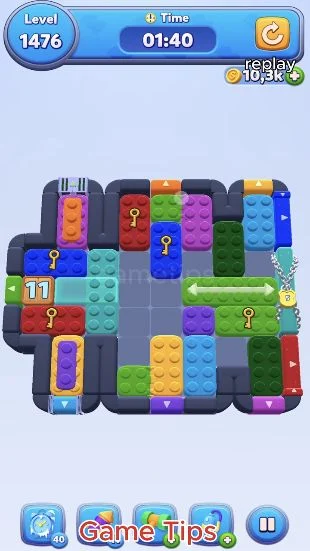
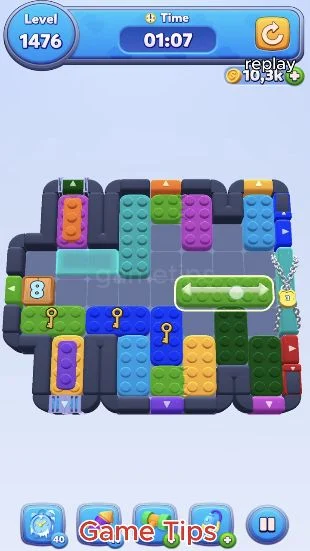
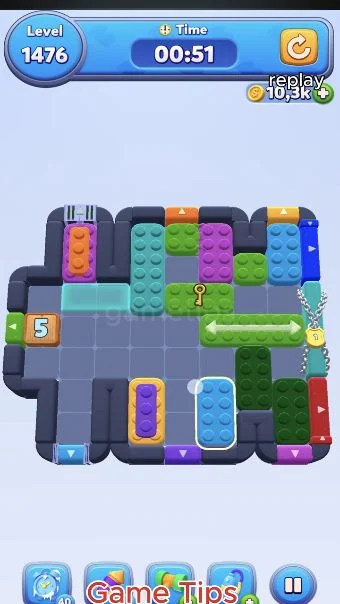
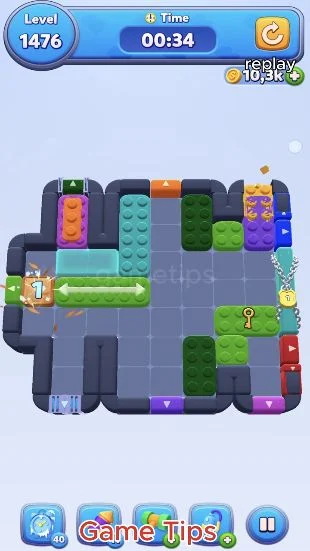
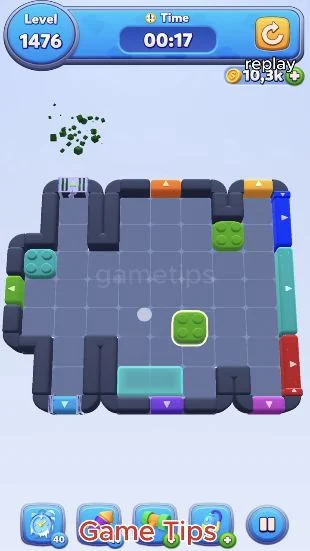
Completion screen at 3:57
Game clock at completion: 00:15. Watch this section ↗
Your checklist stays in this browser. It is not a score or a visitor count.
Where this board can go wrong
- The green arrow bar does not move vertically in this layout. Keep a horizontal gap for it as you work the key blocks.
- A key block can leave a new piece behind after a layer clears. Recheck the colour and available exit instead of repeating the same drag.
- The first half of the source is a failed attempt. The successful replay begins around 2:05 and reaches the win screen near 3:57.
Original recording
The screenshots and checkpoints were reviewed from one published Game Tips recording. They do not establish the layout of every app version. Use the original video for each individual drag.
Game Tips recording · Level 1476 ↗HELP IMPROVE THE ROUTE
Report a different board or a route issue
Tell us your level, which shapes differ, and where the route stops. You can attach a screenshot in the discussion. Comments are public and require a GitHub account.